The WayMade Clear.

v1.7.1.0  ·  Charity Edition  ·  Free

Protecting the people
who protect others.

TaoTab is a free offline security tool for charities and public services — it detects PII, hidden code, and security risks in the documents and data your team handles daily. Nothing is shared, nothing leaves the device, and no budget is required to get started.

✓ PII Detection ✓ Security Scanning ✓ No Internet Free · Charity Edition
26
Programming Languages
detected with reliable precision
0
Bytes ever sent
to any external server
Independent sandboxing
layers for HTML preview
4
Independent workspaces
open in a single session

Every tool your team needs.
Nothing your IT team would fear.

TaoTab is two things at once — a workspace that keeps everything your team is working on in one place, and a security layer that means handling sensitive information never has to be a risk. Neither works without the other. That is the point.

🔏★ Lead Feature
Find & Redact / Redact Selection

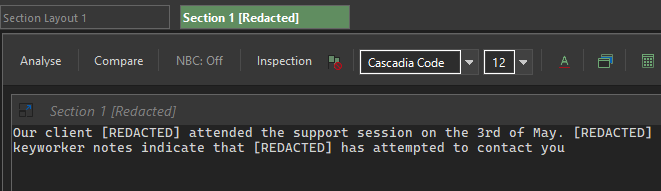
You decide what needs protecting — TaoTab applies the masking. Highlight content directly or search for it, choose a style, and a clean copy is produced without touching the original. Three masking styles: [REDACTED] for formal or legal documents, a visual block-out for review copies, or consistent pseudo-names for comparative work. The judgement stays with your staff, where it belongs.

★ Lead Feature
Inspection Flags

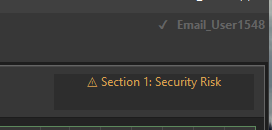
Three independent awareness tools enabled from a single right-click menu — Deep Security Scan, PII Scan, and HTML Secure. Each runs silently and raises a clear, plain-English alert when something warrants attention. No security knowledge required to act on the result. Nothing found is stored or transmitted. It flags. It does not block. Genuine protection for teams who would otherwise have no signal at all.

🛡️★ Lead Feature
HTML Secure Preview

HTML emails, embedded forms, and web-sourced documents are part of daily work — and opening them blindly is a genuine risk. TaoTab renders them inside a sealed viewer using two independent protection layers: active elements are stripped before the content reaches the viewer, and the viewer itself runs in a locked sandbox with no network access and no scripting of any kind. Nothing connects. Nothing executes.

🖼️★ Lead Feature
Image Protection

Charities receive images from vulnerable people and unknown third parties every day. Before any image opens, TaoTab checks its true file signature — not just its name or extension. Files that have been disguised or tampered with are flagged and blocked before they can do anything. No scripts. No embedded content. The risk is stopped before it reaches the screen.

Workflow
Section Layout

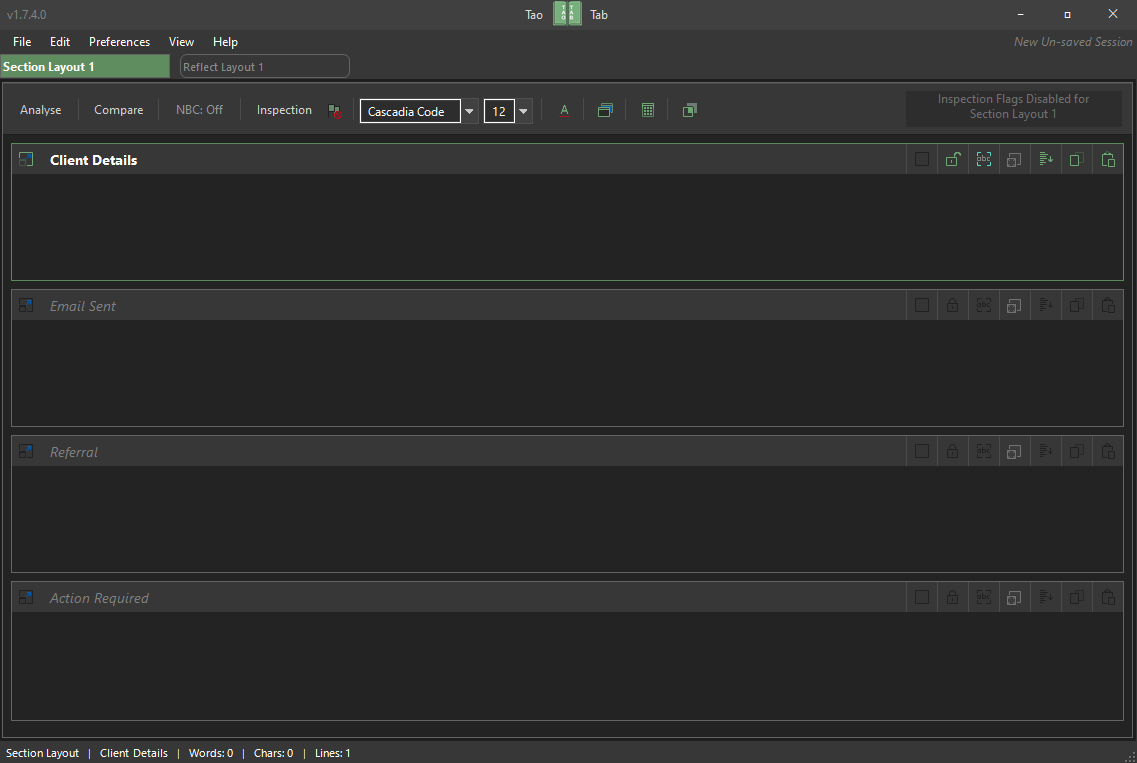
Organises work into multiple independent text sections within a single tab. Each section has its own title, formatting controls, paste tools, and analysis — ideal for case notes, referrals, and structured documents that need to stay clearly separated on screen. Both Section and Reflect layouts support drag-and-drop file import.

Workflow
Reflect Layout

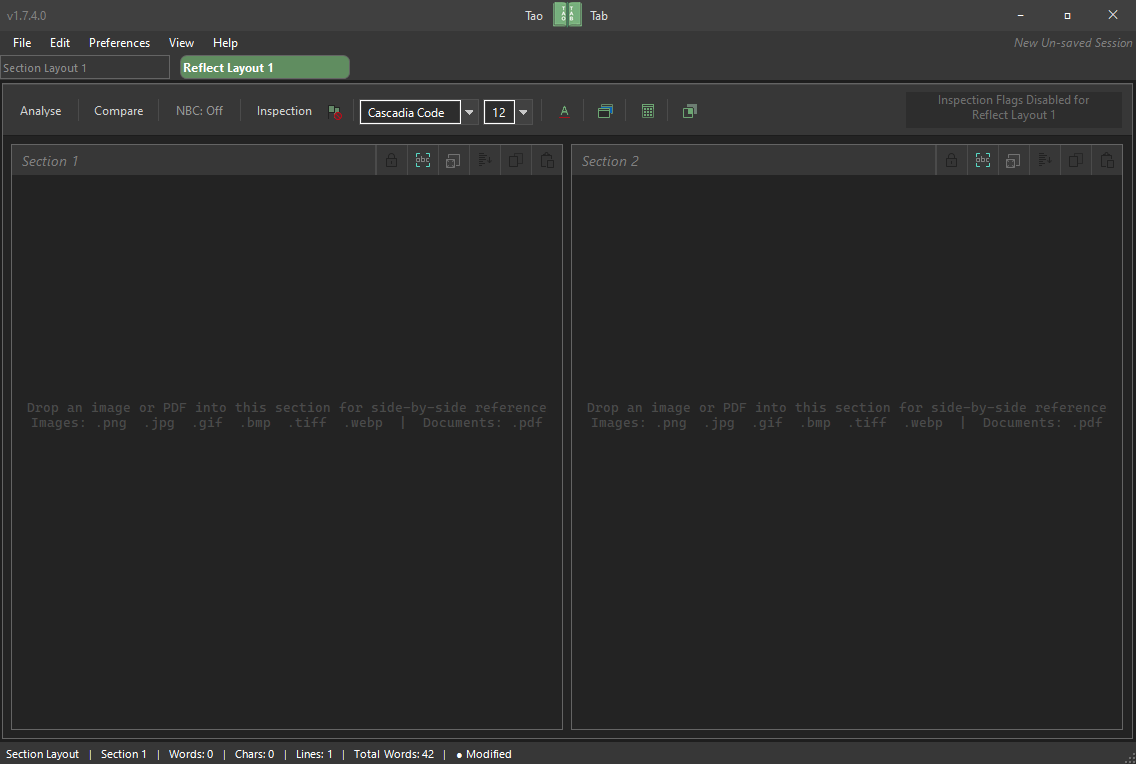
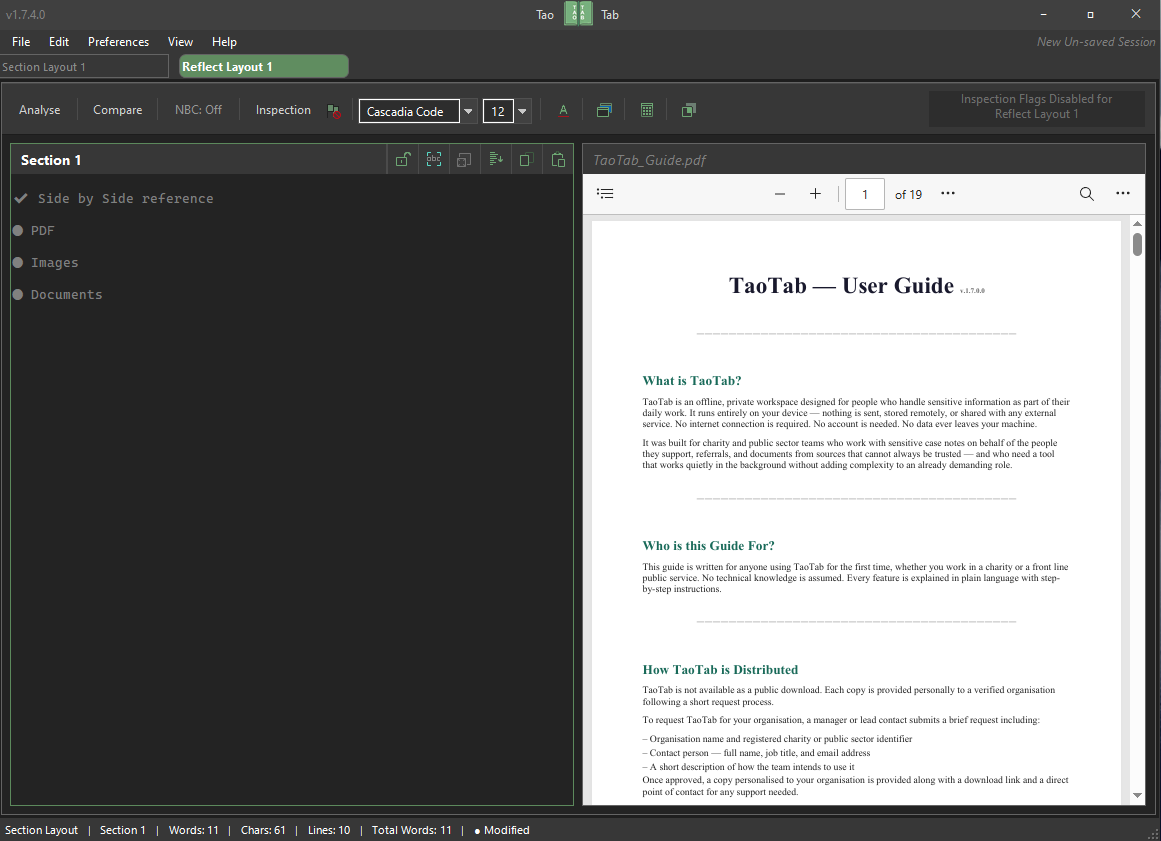
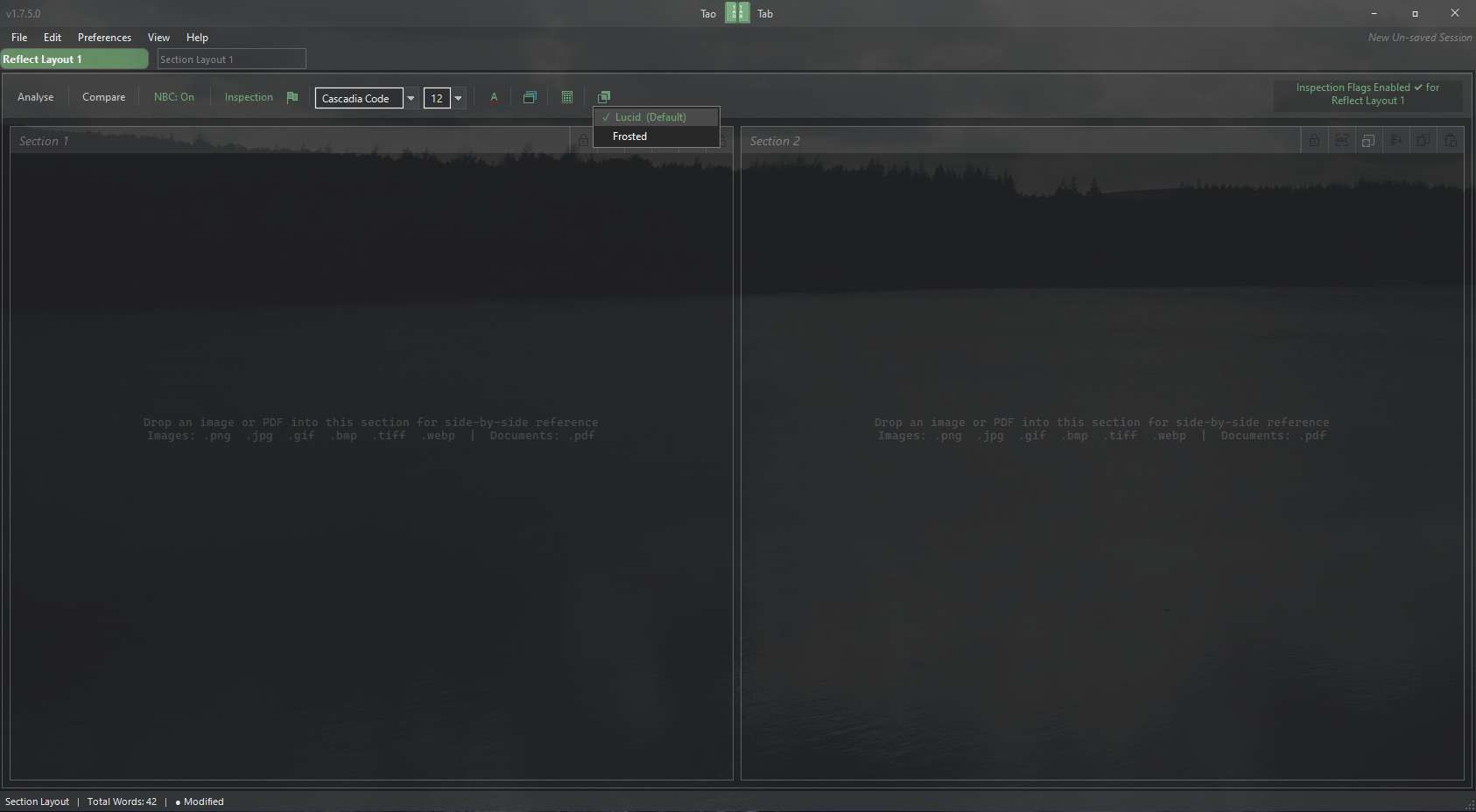
Two sections displayed side by side for direct visual comparison of documents, drafts, or sources of information — without switching between windows or files. Images and PDF documents can be dropped into either pane, making it straightforward to keep a referral or supporting document visible on one side while working with notes or a redacted copy on the other. Shaped differently in the tab bar so it is always identifiable at a glance.

Workflow
Tab Management

Tabs can be renamed, duplicated, reordered by drag, and closed at any time. Right-click shortcuts for adding new tabs of the same type. Sessions are saved and restored exactly as left — all content, layout, and section titles intact.

📂Workflow
Session Import

Load a single saved tab from any previous .taotab file without disturbing current work. A clear picker lets you choose exactly what comes in. Nothing overwritten. No data merged silently. Reference templates and safeguarding frameworks always one import away.

🔒Security
Session File Encryption

Session files can be protected with a password before saving. The file is encrypted using AES-256 — the same standard used in banking and government systems. Without the correct password, the file cannot be opened and its contents cannot be read. The password is set by the user and is never stored or transmitted by TaoTab. If it is lost, no recovery is possible — by design.

🔍Security
Precision Programming Language Detection

A refined three-tier engine covering 26 essential programming languages, tuned for real public sector risks — AI-generated content, email attachments, IT scripts. Precision over volume: 26 well-tuned languages beat 40 noisy ones.

Workflow
Soft Read Format

Presents all text — typed and pasted — in a clean, consistent style, free of invisible formatting carried in from external sources. Useful when content has passed through multiple systems or email clients before reaching you. Enable once; everything entered into that section follows automatically.

Workflow
Display & Reading Controls

Section backgrounds and text colours adjust independently per section and persist with the session — supporting colour-coded workflows across cases or document types. Auto Scroll moves any section at a steady pace for hands-free reading of long referrals or reports, reversing automatically on demand.

Workflow
Compare Sections

Mark any two sections and run a detailed side-by-side analysis to see exactly what has changed between them — what was added, removed, or altered — presented in plain English with no technical detail. Useful for checking whether a forwarded referral has been modified, reviewing two drafts, or comparing a document against an earlier version. An optional accuracy pass silently removes invisible characters and lookalike letters before the comparison runs, so two documents that appear identical to the eye compare correctly even if hidden differences exist within them.


The tools, working
in sequence.

Each workflow is a defined, repeatable process built entirely from TaoTab's existing tools — no setup, no configuration. Named for the tasks your team already faces every day.

01
Referral Integrity Check
Has this referral been altered before it reached you?
  1. Open a Reflect Layout tab and paste the original referral into one pane, the received copy into the other
  2. Enable Inspection Flags — Deep Security Scan and PII Scan — on both sections
  3. Run Compare Sections with Improve Accuracy enabled to account for hidden character substitutions invisible to the eye
  4. Review the plain-English report — differences, additions, removals, and any security findings presented together in a single result
Reflect Layout Inspection Flags Compare Sections Improve Accuracy
02
Share-Ready Redaction
Preparing case notes or a referral for a partner agency — without touching the original.
  1. Paste the document into a Section Layout tab and run Inspection Flags — PII Scan to identify all personal identifiers present
  2. Open PII Redactor and choose the masking style suited to the recipient — formal [REDACTED], visual block-out, or consistent pseudo-names for comparative reading
  3. The redacted copy opens as a new tab — the original section remains completely untouched
  4. Use Export as Plain Text on the redacted tab to produce a clean, formatting-free copy ready to share
Inspection Flags PII Redactor Export as Plain Text
03
Unknown Document Review
An HTML email, embedded form, or document from a source you cannot fully verify.
  1. Paste the content into a section and enable Soft Read Format — this strips invisible formatting carried in from external sources before anything else runs
  2. Enable Inspection Flags — Deep Security Scan and HTML Secure — to check for hidden content and active elements
  3. Open HTML Secure Preview to render the visual content safely — active elements stripped, viewer fully sandboxed with no network access
  4. If a flag is raised, the section is marked clearly in plain English — pass to your manager or IT lead without needing to interpret the detail yourself
Soft Read Format Inspection Flags HTML Secure Preview
04
Case Reference Setup
Reviewing a PDF referral while preparing notes or a redacted copy alongside it.
  1. Open a Reflect Layout tab and drop the PDF into one pane — it opens in a sealed, read-only viewer with scripting disabled and no network access
  2. Use Extract Selected Text to send specific passages to the opposite section, or Extract All Text for the full document in a single step
  3. Enable Section Lock on the extracted content to protect it from accidental edits while working alongside it
  4. Run PII Redactor on the notes section to produce a share-ready copy when the review is complete — original untouched throughout
Reflect Layout PDF Viewer Section Lock PII Redactor
05
Team Reference Library
Shared frameworks and checklists — always one import away, no server required.
  1. Build a reference tab once — a safeguarding framework, a standard redaction checklist, or a contact directory — and save it as a .taotab file
  2. Use Section Lock on each section to protect the reference content from accidental edits before saving
  3. Distribute the file to your team via email or USB — no shared drive, no server, no admin rights needed
  4. Any team member can load it into their current session at any time using Import Tab from Session — nothing already open is disturbed, and the reference sits alongside their active work immediately
Section Layout Section Lock Session Import

The interface,
in plain view.

Reflect Layout Reflect Layout
Section Layout Section Layout
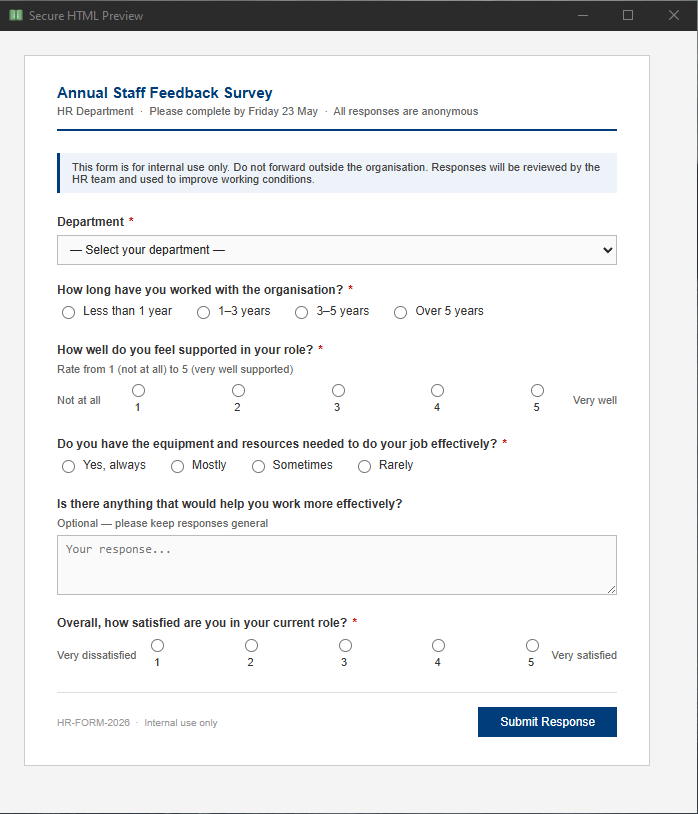
HTML Secure Preview HTML Secure Preview
Find and Redact Find & Redact
PDF Viewer PDF Viewer
Inspection Flags Inspection Flags
Built on a
non-negotiable baseline.

For charities and public sector teams trusted with the most sensitive information — case notes, safeguarding records, personal histories — offline-first is not a feature. It is the baseline. TaoTab does not connect to the internet. It does not send data. It does not require an account. Everything happens on your device, under your control.

TaoTab is a defence program. It finds. It flags. It stops. It does not decode, execute, or act on anything it detects. What happens next belongs entirely to the person holding the information — whether that is passing it to a manager, a safeguarding lead, or the relevant authority. TaoTab lights the path. The user decides to walk it.

This is not a limitation. It is the principle the entire program is built on. Like a diagnosis without a procedure — the awareness is provided, the responsibility remains where it belongs. Every final decision stays with the trained person doing the work, not the software.

AI tools require your content to leave the device.
TaoTab exists precisely for the work that cannot.

No Internet TaoTab never initiates a network connection of any kind.
No Account No sign-up, no login, no licence key. Download and run.
No Telemetry Zero analytics, usage data, or crash reports leave the device.

Independently verified
before every release.

Every release of TaoTab is scanned and sandbox-tested before distribution. The reports below are permanent, publicly accessible records tied to the exact installer file by cryptographic hash — not claims made by the developer. Any IT lead can open these links and verify the findings directly.

VirusTotal — 71 Engines 3 heuristic flags — all major engines clean. Avast, BitDefender, CrowdStrike, Kaspersky, Malwarebytes: undetected. View Report →
Any.run — Live Sandbox Run in a live Windows 10 VM. Zero network connections made by TaoTab. All HTTP activity confirmed as Windows system processes only. View Report →
Current Release — v1.7.1.0 Reports are tied to the exact installer file. A fresh scan is run for each release before it is distributed.

Access that stays
aligned with the mission.

TaoTab is provided free of charge to registered charities and public service organisations — because a limited budget should never be the reason a team is left exposed. To ensure TaoTab remains aligned with its purpose for social good, all access is granted via a verified request process. If your organisation's mission aligns with ours, please contact us for information on how to receive a licensed copy. Everyone who uses TaoTab carries the same responsibility — to hold the information in their care with the same trust it was given.

Registered Charities UK registered charities with a verified charity number
Public Services Public sector bodies and government-funded organisations
Third Sector Non-profits, social enterprises, and community interest companies

Runs quietly on
everyday hardware.

TaoTab is designed to be lightweight. It does not require modern or powerful hardware — most office machines running Windows 10 or 11 will run it without issue.

TaoTab runs on Windows 10 and Windows 11 only. It is a Windows desktop application and is not available for Mac, Linux, iOS, or Android.

Operating System Windows 10 · Windows 11
Processor Dual Core 2.0 GHz or higher
Memory 2 GB RAM
Disk Space 50 MB
Graphics Integrated graphics or higher
.NET Framework 4.7.2 — pre-installed on Windows 10 (version 1803 and later) and Windows 11
WebView2 Runtime Required for HTML Secure Preview — included with Microsoft Edge and pre-installed on most Windows 10 and 11 machines
No Installation Complexity Standard Windows installer — no technical knowledge required to set up
No Admin Rights Needed Runs on standard user accounts — no IT department sign-off required to install
No Internet After Install Once installed, TaoTab runs entirely offline — no ongoing connection required

AJ Stillwater

AJ Stillwater specialises in data hygiene and rigorous security within the United Kingdom. Dedicated to the intersection of civil society integrity and advanced technical engineering.

TaoTab exists because charities and public services face the same digital risks as any organisation — but without the same IT budgets, security teams, or margin for error. In the UK, funding pressures on the third sector have never been greater. The tools should never become the vulnerability simply because the budget ran out.

This version of TaoTab is provided free of charge to qualifying third-sector and public service organisations — built specifically for the people doing this work.

TaoTab is installed software — it runs on your device and works independently of any server, subscription, or ongoing connection. The support offered is personal and direct, but the program itself belongs to your organisation once installed. It does not expire, it does not go dark, and it does not depend on anyone staying active to keep working. That is a deliberate design decision.

The sophistication stays inside the program. The result stays simpler and safer.

Current Release
v1.7.1.0
  • Section & Reflect dual workspace layouts
  • Tab management — rename, duplicate, reorder
  • Session import with tab picker
  • Inspection Flags — first-line awareness engine
  • Find & Redact / Redact Selection — three masking styles, user-controlled
  • 26 programming language precision detection
  • Dual-layer HTML secure preview
  • Image signature verification
  • Soft Read Format clean display mode
  • Per-section panel & font colours
  • Hands-free auto scroll
  • Full keyboard shortcut support

Request access —
become a Guardian.

TaoTab is offered directly and personally — not distributed openly. Every request is read individually and every organisation is verified before access is granted. This is a considered process, and that is intentional.

If your organisation is a registered UK charity or public service genuinely working to protect the people in your care, we would like to hear from you. Every organisation that receives TaoTab receives direct, personal support alongside it — a real person, not a helpdesk. You will know exactly who to contact and how.

Please include your organisation's name and registered charity number when making contact. All requests are verified through the public charity register. Requests submitted with full details are typically reviewed within a few working days. TaoTab is offered selectively — not because access is difficult, but because the people it protects deserve to know it is in the right hands.

aj@ajstillwater.uk

The Guardian's
Agreement.

What TaoTab Is For

TaoTab was built for the people who carry other people's stories — support workers, caseworkers, and volunteers at charities and public services who handle sensitive information as part of their daily work. It is provided free of charge to qualifying organisations because the work matters and the tools should not become the vulnerability.

If you are reading this as a member of staff at a registered charity or public service, TaoTab is here for you. Use it. Trust it. It will not share your work, connect to the internet, or ask anything of you beyond the responsibility you already carry.

This Version of TaoTab

This release of TaoTab — v1.7.1.0 — is designed specifically for registered charities, public services, and third-sector organisations. Other versions of TaoTab may exist for different sectors and contexts. If you are using this version within a qualifying organisation, it was built with you in mind.

TaoTab Is a Workspace, Not a Document Store

TaoTab is designed for active work — reviewing, comparing, annotating, and preparing content during a session. It is not a document management system, a records archive, or a backup solution. Original documents, case files, and records must remain in your organisation's own secure systems at all times. TaoTab should work alongside those systems, not replace them.

This matters particularly when session file encryption is in use. If a password is lost, the session file cannot be recovered — by anyone, including TaoTab. If original documents exist only inside an encrypted session file, they are gone. That is the intended behaviour of the encryption, and it is why originals must never live in TaoTab alone. AJ Stillwater accepts no liability for data loss arising from lost passwords or session files used as primary storage.

The Guardian's Agreement

If you are using TaoTab with the intention of protecting the people in your care — that is the agreement. That is all it has ever been.

TaoTab exists for this work and the people doing it. The judgement of how to handle the information in your care has always belonged to you — TaoTab's position is simply to support that, never to question it. Your organisation's own safeguarding procedures and data policies remain exactly as they are. TaoTab stands quietly alongside them.

If that is you and your organisation, TaoTab is on your side.

A Note for Anyone Else — TaoTab is not a public tool. It was built for a specific purpose, for specific people, doing specific work. If you are using it outside that context — or with the intention of misusing the trust placed in this software and the people it serves — you are in breach of this agreement and acting against the purpose this programme was built for.

TaoTab is the intellectual property of AJ Stillwater. It is provided to qualifying organisations in good faith, to support the important work they do.